예외 처리2
예외 처리 도입
예외처리 로직이 정상로직과 섞여있어 가독성이 떨어지는 부분을 고쳐보자
package exception.ex2;

public class NetworkClientExceptionV2 extends Exception {
    private String errorCode;

    public NetworkClientExceptionV2(String errorCode, String message) {
        super(message); // 오류 메시지( `message` )에는 어떤 오류가 발생했는지 개발자가 보고 이해할 수 있는 설명을 담아둔다. (기본기능)
        this.errorCode = errorCode;
    }

    public String getErrorCode() {
        return errorCode;
    }
}
package exception.ex2;

public class NetworkClientV2 {
    private final String address;
    public boolean connectError;
    public boolean sendError;

    public NetworkClientV2(String address) {
        this.address = address;
    }

    public void connect() throws NetworkClientExceptionV2 {
        if (connectError) {
            throw new NetworkClientExceptionV2("connectError", address + " 서버 연결 실패");
        }
        //연결 성공
        System.out.println(address + " 서버 연결 성공");
    }

    public void send(String data) throws NetworkClientExceptionV2 {
        if (sendError) {
            throw new NetworkClientExceptionV2("sendError", address + " 서버에 데 이터 전송 실패: " + data);
        }
        //전송 성공
        System.out.println(address + " 서버에 데이터 전송: " + data);
    }

    public void disconnect() {
        System.out.println(address + " 서버 연결 해제");
    }

    public void initError(String data) {
        if (data.contains("error1")) {
            connectError = true;
        }
        if (data.contains("error2")) {
            sendError = true;
        }
    }
}
public class NetworkServiceV2_1 {
    public void sendMessage(String data) throws NetworkClientExceptionV2 {
        String address = "http://example.com";
        NetworkClientV2 client = new NetworkClientV2(address);
        client.initError(data);
        client.connect();
        client.send(data);
        client.disconnect();
    }
}
package exception.ex2;

import java.util.Scanner;

public class MainV2 {
    public static void main(String[] args) throws NetworkClientExceptionV2 {
        NetworkServiceV2_1 networkService = new NetworkServiceV2_1();
        Scanner scanner = new Scanner(System.in);
        while (true) {

            System.out.print("전송할 문자: ");
            String input = scanner.nextLine();
            if (input.equals("exit")) {
                break;
            }
            networkService.sendMessage(input);
            System.out.println();
        }
        System.out.println("프로그램을 정상 종료합니다.");
    }
}
실행 결과
전송할 문자: hello
http://example.com 서버 연결 성공
http://example.com 서버에 데이터 전송: hello
http://example.com 서버 연결 해제


전송할 문자: exit
프로그램을 정상 종료합니다.
실행 결과2
전송할 문자: error1
Exception in thread "main" exception.ex2.NetworkClientExceptionV2: http:// example.com 서버 연결 실패
    at exception.ex2.NetworkClientV2.connect(NetworkClientV2.java:15)
    at
exception.ex2.NetworkServiceV2_1.sendMessage(NetworkServiceV2_1.java:11)
    at exception.ex2.MainV2.main(MainV2.java:22)
전송할 문자: error2
http://example.com 서버 연결 성공
Exception in thread "main" exception.ex2.NetworkClientExceptionV2: http:// example.com 서버에 데이터 전송 실패: error2
    at exception.ex2.NetworkClientV2.send(NetworkClientV2.java:23)
    at
exception.ex2.NetworkServiceV2_1.sendMessage(NetworkServiceV2_1.java:12)
    at exception.ex2.MainV2.main(MainV2.java:22)
문제
- 예외 처리가 되지 않았다.
disconnect()를 호출하여 연결을 해제해야 한다.
예외 복구
package exception.ex2;

public class NetworkServiceV2_2 {
    public void sendMessage(String data) {
        String address = "http://example.com";
        NetworkClientV2 client = new NetworkClientV2(address);
        client.initError(data);
        try {
            client.connect();
        } catch (NetworkClientExceptionV2 e) {
            System.out.println("[오류] 코드: " + e.getErrorCode() + ", 메시지: " + e.getMessage());
            return;
        }
        try {
            client.send(data);
        } catch (NetworkClientExceptionV2 e) {
            System.out.println("[오류] 코드: " + e.getErrorCode() + ", 메시지: " + e.getMessage());
            return;
        }
        client.disconnect();
    }
}
실행 결과
전송할 문자: hello
http://example.com 서버 연결 성공
http://example.com 서버에 데이터 전송: hello
http://example.com 서버 연결 해제

전송할 문자: error1
[오류] 코드: connectError, 메시지: http://example.com 서버 연결 실패

전송할 문자: error2
http://example.com 서버 연결 성공
[오류] 코드: sendError, 메시지: http://example.com 서버에 데이터 전송 실패: error2

전송할 문자: exit
프로그램을 정상 종료합니다.
문제
- 예외를 잡아서 처리 했지만 여전히
disconnect()는 호출이 안되어 있다. - 또 정상, 예외 흐름 분리가 안되어 있다.
정상, 예외 흐름 분리
package exception.ex2;

public class NetworkServiceV2_3 {
      public void sendMessage(String data) {
          String address = "http://example.com";
          NetworkClientV2 client = new NetworkClientV2(address);
          client.initError(data);

          try { // 정상 흐름은 `try` 블럭에 들어가고, 예외 흐름은 `catch` 블럭으로 명확하게 분리
              client.connect();
              client.send(data);
              client.disconnect(); //예외 발생시 무시
          } catch (NetworkClientExceptionV2 e) {
              System.out.println("[오류] 코드: " + e.getErrorCode() + ", 메시지: " + e.getMessage());
          }
      }
}
문제
- 여전히
disconnect()는 호출이 안되어 있다.
리소스 반환 문제
package exception.ex2;
  public class NetworkServiceV2_4 {
      public void sendMessage(String data) {
          String address = "http://example.com";
          NetworkClientV2 client = new NetworkClientV2(address);
          client.initError(data);
          try {
              client.connect();
              client.send(data);
          } catch (NetworkClientExceptionV2 e) {
              System.out.println("[오류] 코드: " + e.getErrorCode() + ", 메시지: " + e.getMessage());
          }
          //NetworkClientException이 아닌 다른 예외가 발생해서 예외가 밖으로 던져지면 무시
          client.disconnect();
      }
  }
실행 결과
전송할 문자: hello
http://example.com 서버 연결 성공
http://example.com 서버에 데이터 전송: hello
http://example.com 서버 연결 해제

전송할 문자: error1
[오류] 코드: connectError, 메시지: http://example.com 서버 연결 실패
http://example.com 서버 연결 해제

전송할 문자: error2
http://example.com 서버 연결 성공
[오류] 코드: sendError, 메시지: http://example.com 서버에 데이터 전송 실패: error2
http://example.com 서버 연결 해제

전송할 문자: exit 프로그램을 정상 종료합니다.
문제
- 예상치 못한 에러 발생시 자원 회수가 안된다.
try catch구분밖 orNetworkClientExceptionV2이외의 에러
finally
package exception.ex2;

public class NetworkServiceV2_5 {
    public void sendMessage(String data) {
        String address = "https://example.com";
        NetworkClientV2 client = new NetworkClientV2(address);
        client.initError(data);
        try {
            client.connect();
            client.send(data);
        } catch (NetworkClientExceptionV2 e) {
            System.out.println("[오류] 코드: " + e.getErrorCode() + ", 메시지: " + e.getMessage());
        } finally {
            client.disconnect();
        }
    }
}
try ~ finally
다음과 같이 catch 없이 try ~ finally 만 사용할 수도 있다.
try {
      client.connect();
      client.send(data);
} finally{
      client.disconnect();
}
예외 계층
예외를 계층화해 좀 더 세밀하게 처리해 보자.
package exception.ex3.exception;

public class NetworkClientExceptionV3 extends Exception {
    public NetworkClientExceptionV3(String message) {
        super(message);
    }
}
자식 예외1
package exception.ex3.exception;

public class ConnectExceptionV3 extends NetworkClientExceptionV3 {
    private final String address;

    public ConnectExceptionV3(String address, String message) {
        super(message);
        this.address = address;
    }

    public String getAddress() {
        return address;
    }
}
자식 예외2
package exception.ex3.exception;

public class SendExceptionV3 extends NetworkClientExceptionV3 {
    private final String sendData;

    public SendExceptionV3(String sendData, String message) {
        super(message);
        this.sendData = sendData;
    }

    public String getSendData() {
        return sendData;
    }
}
package exception.ex3;

import exception.ex3.exception.ConnectExceptionV3;
import exception.ex3.exception.SendExceptionV3;

public class NetworkClientV3 {
    private final String address;
    public boolean connectError;
    public boolean sendError;

    public NetworkClientV3(String address) {
        this.address = address;
    }

    public void connect() throws ConnectExceptionV3 {
        if (connectError) {
            throw new ConnectExceptionV3(address, address + " 서버 연결 실패");
        }
        System.out.println(address + " 서버 연결 성공");
    }

    public void send(String data) throws SendExceptionV3 {
        if (sendError) {
            throw new SendExceptionV3(data, address + " 서버에 데이터 전송 실패: " + data);
        }
        System.out.println(address + " 서버에 데이터 전송: " + data);
    }

    public void disconnect() {
        System.out.println(address + " 서버 연결 해제");
    }

    public void initError(String data) {
        if (data.contains("error1")) {
            connectError = true;
        }
        if (data.contains("error2")) {
            sendError = true;
        }
    }
}
package exception.ex3;

import exception.ex3.exception.ConnectExceptionV3;
import exception.ex3.exception.SendExceptionV3;

public class NetworkServiceV3_1 {
    public void sendMessage(String data) {
        String address = "https://example.com";
        NetworkClientV3 client = new NetworkClientV3(address);
        client.initError(data);
        try {
            client.connect();
            client.send(data);
        } catch (ConnectExceptionV3 e) {
            System.out.println("[연결 오류] 주소: " + e.getAddress() + ", 메시지: " + e.getMessage());
        } catch (SendExceptionV3 e) {
            System.out.println("[전송 오류] 전송 데이터: " + e.getSendData() + ", 메 시지: " + e.getMessage());
        } finally {
            client.disconnect();
        }
    }
}
실행결과
전송할 문자: hello
https://example.com 서버 연결 성공
https://example.com 서버에 데이터 전송: hello
https://example.com 서버 연결 해제

전송할 문자: error1
[연결 오류] 주소: https://example.com, 메시지: https://example.com 서버 연결 실패
https://example.com 서버 연결 해제

전송할 문자: error2
https://example.com 서버 연결 성공
[전송 오류] 전송 데이터: error2, 메시지: https://example.com 서버에 데이터 전송 실패: error2
https://example.com 서버 연결 해제

전송할 문자: exit 프로그램을 정상 종료합니다.
활용
예외가 발생했을 때
catch를 순서대로 실행하므로, 더 디테일한 자식을 먼저 잡아야 한다.
package exception.ex3;

import exception.ex3.exception.ConnectExceptionV3;
import exception.ex3.exception.NetworkClientExceptionV3;

public class NetworkServiceV3_2 {
    public void sendMessage(String data) {
        String address = "https://example.com";
        NetworkClientV3 client = new NetworkClientV3(address);
        client.initError(data);
        try {
            client.connect();
            client.send(data);
        } catch (ConnectExceptionV3 e) {
            System.out.println("[연결 오류] 주소: " + e.getAddress() + ", 메시지: "
                    + e.getMessage());
        } catch (NetworkClientExceptionV3 e) {
            System.out.println("[네트워크 오류] 메시지: " + e.getMessage());
        } catch (Exception e) { // 이외의 모든 오류들이 잡힌다.
            System.out.println("[알 수 없는 오류] 메시지: " + e.getMessage());
        } finally {
            client.disconnect();
        }
    }
}
실행결과
전송할 문자: hello
https://example.com 서버 연결 성공
https://example.com 서버에 데이터 전송: hello
https://example.com 서버 연결 해제

전송할 문자: error1
[연결 오류] 주소: https://example.com, 메시지: https://example.com 서버 연결 실패
https://example.com 서버 연결 해제

전송할 문자: error2
https://example.com 서버 연결 성공
[네트워크 오류] 메시지: https://example.com 서버에 데이터 전송 실패: error2
https://example.com 서버 연결 해제

전송할 문자: exit 프로그램을 정상 종료합니다.
여러 예외를 한번에 잡는 방법
try {
    client.connect();
    client.send(data);
} catch (ConnectExceptionV3 | SendExceptionV3 e) {
    System.out.println("[연결 또는 전송 오류] 주소: , 메시지: " + e.getMessage());
} finally{
    client.disconnect();
}
실무 예외 처리 방안
체크 예외는 개발자들이 실수로 놓칠 수 있는 예외 처리를 컴파일러가 잡아 줄 수 있어 이점이 있지만, 최근엔 처리할 수 없는 예외들이 많아지, 복잡해지면서체크 예외를 사용하는것이 부담스러워 졌다.
체크 예외 사용 시나리오
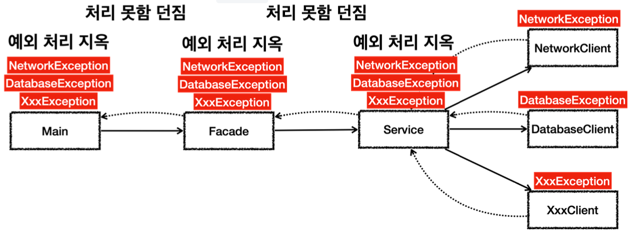
위와 같이 에러 지옥에 빠지게 될 경우 최상위 부모 객체인 Exception를 사용하는 악수를 두게 된다.
이렇게 넣으면 모든 예외 를 다 던질 수 있다.
class Facade {
      void send() throws Exception
}
class Service {
      void sendMessage(String data) throws Exception
}
체크 예외에서 Exception의 문제점
Exception을 던지게 되면 다른 체크 예외를 체크할 수 있는 기능이 무효화 되고, 중요한 체크 예외를 다 놓치게 된다.
중간에 중요한 체크 예외가 발생해도 컴파일러는Exception을 던지기 때 문에 문법에 맞다고 판단해서 컴파일 오류가 발생하지 않는다.
꼭 필요한 경우가 아 니면 이렇게Exception자체를 밖으로 던지는 것은 좋지 않은 방법이다.
잘못된 예시
public class Main {
    public static void main(String[] args) {
        TestDB testDB = new TestDB();
        TestFile testFile = new TestFile();
        try {
            testDB.save();
            testFile.getFile(); // 나중에 추가된 서비스의 에러를 놓치게 된다.
        } catch (Exception e) {
            System.out.println("DB 저장 에러!!");
        }
    }
}

public class TestDB {
    public void save() throws Exception {
        throw new SQLException("DB 에러 발생");
    }
}

public class TestFile { // 나중에 추가됨(에러를 잡아서 처리해 줘야 함)
    void getFile() throws FileNotFoundException {
        throw new FileNotFoundException("파일이 없음!!");
    }
}
정상 예시
public class Main {
    public static void main(String[] args) {
        TestDB testDB = new TestDB();
        TestFile testFile = new TestFile();
        try {
            testDB.save();
            testFile.getFile();
        } catch (SQLException e) {
            System.out.println("DB 저장 에러!!");
        } catch (FileNotFoundException e){ // 분기 처리 완료
            System.out.println("File 호출 에러!!");
        }
    }
}

public class TestDB {
    public void save() throws SQLException {
        throw new SQLException("DB 에러 발생");
    }
}

public class TestFile {
    void getFile() throws FileNotFoundException {
        throw new FileNotFoundException("파일이 없음!!");
    }
}
언체크 예외 시나리오
최근 실무에선 대부분 예외를 잡아도 해결할 수 있는 것이 거의 없다. 때문에 잡아도 복구할 수 없기 때문에 무시하고 필요한 예외만 잡으면 된다.
만약 웹이라면 오류 페이지를 보여주면 된다. 그리고 내부 개발자가 지금의 문 제 상황을 빠르게 인지할 수 있도록, 오류에 대한 로그를 남겨두면 된다. 이런 부분은 공통 처리가 가능하다.
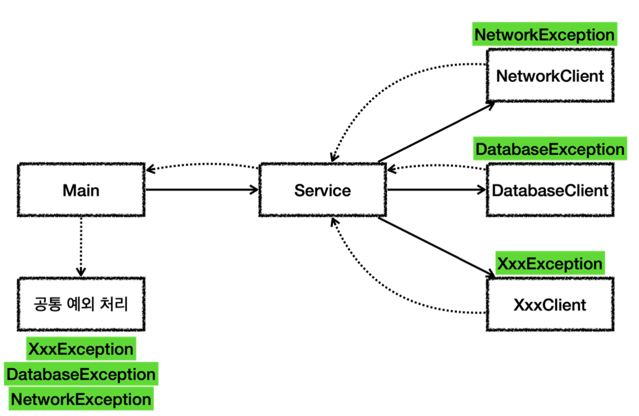
public class MainV4 {
    public static void main(String[] args) {
        NetworkServiceV4 networkService = new NetworkServiceV4();
        Scanner scanner = new Scanner(System.in);
        while (true) {
            System.out.print("전송할 문자: ");
            String input = scanner.nextLine();
            if (input.equals("exit")) {
                break;
            }
            try {
                networkService.sendMessage(input);
            } catch (Exception e) { // 모든 예외를 잡아서 처리
                exceptionHandler(e);
            }
            System.out.println();
        }
        System.out.println("프로그램을 정상 종료합니다.");
    }

    //공통 예외 처리
    private static void exceptionHandler(Exception e) {
        //공통 처리
        System.out.println("사용자 메시지: 죄송합니다. 알 수 없는 문제가 발생했습니다.");
        System.out.println("==개발자용 디버깅 메시지==");
        e.printStackTrace(System.out); // 스택 트레이스 출력
        // e.printStackTrace(); // System.err에 스택 트레이스 출력

        //필요하면 예외 별로 별도의 추가 처리 가능
        if (e instanceof SendExceptionV4 sendEx) {

            System.out.println("[전송 오류] 전송 데이터: " + sendEx.getSendData());
        }
    }
}
try-with-resources
외부 자원을 사용하는 경우 반드시 자원을 해제해야 한다. 자바 7에서 도입된
Try with resources를 알아본다.
이 기능을 사용하려면 먼저 AutoCloseable 인터페이스를 구현해야 한다.
public interface AutoCloseable {
      void close() throws Exception;
}
다음과 같이 사용시 try 가 끝나는 시점에 close() 가 자동으로 호출된다.
try (Resource resource = new Resource()) {
    // 리소스를 사용하는 코드
}
예시
import exception.ex4.exception.ConnectExceptionV4;
import exception.ex4.exception.SendExceptionV4;

public class NetworkClientV5 implements AutoCloseable {

    private final String address;
    public boolean connectError;
    public boolean sendError;

    public NetworkClientV5(String address) {
        this.address = address;
    }

    public void connect() {
        if (connectError) {
            throw new ConnectExceptionV4(address, address + " 서버 연결 실패");
        }
        System.out.println(address + " 서버 연결 성공");
    }


    public void send(String data) {
        if (sendError) {
            throw new SendExceptionV4(data, address + " 서버에 데이터 전송 실패: " + data);
        }
        System.out.println(address + " 서버에 데이터 전송: " + data);
    }


    public void disconnect() {
        System.out.println(address + " 서버 연결 해제");
    }

    public void initError(String data) {
        if (data.contains("error1")) {
            connectError = true;
        }
        if (data.contains("error2")) {
            sendError = true;
        }
    }

    @Override
    public void close() {
        System.out.println("NetworkClientV5.close");
        disconnect();
    }
}
public class NetworkServiceV5 {

    public void sendMessage(String data) {
        String address = "https://example.com";

        try (NetworkClientV5 client = new NetworkClientV5(address)) {
            client.initError(data);
            client.connect();
            client.send(data);
        } catch (Exception e) {
            System.out.println("[예외 확인]: " + e.getMessage());
            throw e;
        }
    }
}
정리
최근 라이브러리들은 대부분 런타임 예외를 기본으로 제공한다. 가장 유명한 스프링이 나 JPA 같은 기술들도 대부분 언체크(런타임) 예외를 사용한다. 런타임 예외도 필요하면 잡을 수 있기 때문에 필요한 경우에는 잡아서 처리하고, 그렇지 않으면 자연스럽게 던지도록 둔다. 그리고 처리할 수 없는 예외는 예외를 공통으로 처리하는 부분을 만들어서 해결하면 된다.